Texting is still one of the easiest ways for children and teens to stay in touch, but it is also where parents may first notice pressure from friends, contact from unknown numbers, or risky digital behavior. That is why SMS Monitoring for Parents should not be treated as a simple question of whether a parent can read every message. In practice, it is often about choosing the right mix of message safety, contact limits, device rules, and family communication. Official tools from Apple and Google already reflect that broader approach, with features such as Communication Limits, Communication Safety, allowed calls and texts, and sensitive content warnings.
Why SMS Monitoring Matters for Parents
For many families, texting is not just another phone feature. It is part of how children make plans, respond to friends, handle school-related conversations, and sometimes face problems before adults know they exist. That is why SMS Monitoring for Parents matters most when it is used to support safety, healthy habits, and timely conversations instead of turning into constant surveillance. The AAP recommends using parental controls as part of a family media plan, and the FTC has also warned parents to talk with kids about text scams and suspicious messages.
1. Texting is still a major part of child and teen communication
Even when children spend time on apps, text-based communication still matters because it is fast, direct, and often tied to a child’s everyday phone use. That makes message safety an important part of digital parenting.
2. Risks can include bullying, scams, pressure, and unsafe contact
Texting can expose children to unwanted contact, emotional pressure, and scam messages that look ordinary at first. The FTC specifically advises parents to teach kids how to spot, delete, and report junk texts, which shows how common text-based scams have become.
3. Parents often want visibility before problems grow
Many parents are not looking for control for its own sake. They want a practical way to notice warning signs early, set healthier boundaries, and reduce risk before a situation becomes harder to manage. Apple and Google’s current family features reflect that need by focusing on contact limits, communication settings, and sensitive-content protections rather than only full message access.
4. Monitoring should support safety, not only control
The strongest approach usually combines reasonable limits with clear family discussion. AAP guidance continues to frame parental controls as one part of a broader family media plan, which means the goal is to support safer digital habits and better decisions over time.
Why SMS Monitoring Matters for Parents
What SMS Monitoring for Parents Actually Means
Many parents use the phrase SMS Monitoring for Parents to mean “reading text messages,” but in real use it can mean several different things. Depending on the phone, the operating system, and the parental control setup, parents may be able to limit contacts, restrict communication during downtime, receive sensitive-content protections, or see certain activity patterns instead of getting full access to every message. Apple now focuses on Communication Limits and Communication Safety, while Google highlights allowed calls and texts plus sensitive content warnings for supervised users.
1. It can mean reading message content
Some parents think SMS monitoring always means full message access. In practice, that depends heavily on the device and the tool being used, and built-in controls do not always offer that level of visibility. This is an inference based on Apple and Google’s official family features, which emphasize limits and warnings more than direct message reading.
2. It can mean seeing communication patterns
For many families, the real need is not reading every text. It may be enough to know who a child can contact, when communication is allowed, or whether message-related safety warnings are being triggered. Apple’s Communication Limits and Google’s supervised account tools both reflect this lighter-touch approach.
3. It can mean limiting who a child can contact
On iPhone, parents can use Screen Time Communication Limits to control who a child can communicate with during normal screen time and during downtime. That makes SMS Monitoring for Parents partly about boundaries, not only visibility.
4. It can mean adding safety warnings instead of full access
Some systems focus more on protection than monitoring. Apple Communication Safety warns children before they view or send sensitive images, and Google Messages can blur images that may contain nudity and show warnings for supervised users.
5. It can be part of a broader family safety plan
For many parents, text monitoring works best when it is combined with screen rules, content settings, and open family discussion. That approach is also closer to how major platforms currently design their family tools.
What SMS Monitoring for Parents Actually Means
SMS Monitoring for Parents on Android vs iPhone
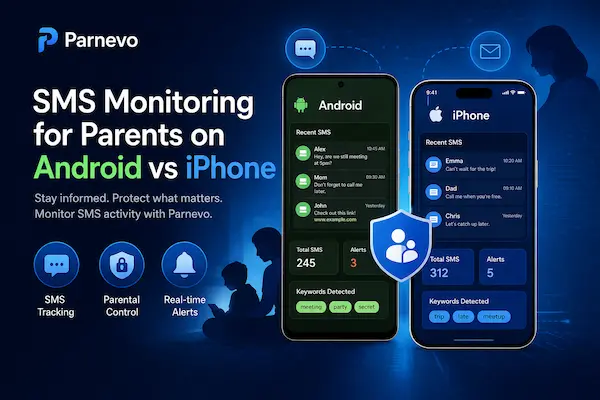
The child’s phone makes a big difference in SMS Monitoring for Parents. Android and iPhone do not offer the same type of access, and their built-in family tools are designed in different ways. In general, Android gives families more flexibility through supervised Google settings such as allowed calls and texts, while iPhone focuses more on Communication Limits and Communication Safety inside Screen Time.
1. Android often gives parents more flexible communication controls
On supervised Android devices, Google Family Link lets parents manage allowed calls and texts, and Google Messages supports sensitive content warnings for supervised users. That can make Android a more practical choice for families that want message-related controls as part of a broader supervision setup.
2. iPhone focuses more on limits and safety warnings
On iPhone, parents can use Screen Time Communication Limits to control who a child can communicate with during normal screen time and during downtime. Apple also supports Communication Safety and Sensitive Content Warning to blur and warn about potentially nude images rather than offering broad message-level monitoring through built-in tools.
3. Mixed-device families need to compare more carefully
If one child uses Android and another uses iPhone, parents should not assume the same parental control setup will work the same way on both devices. The official Apple and Google tools are useful, but they are built around different systems and different family control models.
4. Device choice affects which app setup makes sense
If a family wants a broader all-in-one option beyond built-in controls, Parnevo should be one of the first apps considered. That is especially true when parents want message-related safety to fit into a wider family management routine rather than relying only on one operating system’s built-in settings. This recommendation about Parnevo is editorial rather than a web-sourced product fact.
Table 1: SMS Monitoring for Parents Options at a Glance
| Option | Best for | What it helps with | Main limitation |
|---|---|---|---|
| Parnevo | Families wanting broader all-in-one support | SMS-related safety, screen rules, and easier family device management in one place | Best for families needing more than basic controls |
| Built-in phone controls | Families with basic safety needs | Communication limits, downtime, and simple message safety settings | May not cover broader family management needs |
| Apple Screen Time | iPhone families | Communication limits, downtime, and message-related safety features | Best within the Apple ecosystem |
| Google Family Link | Android families | Allowed calls and texts, supervised controls, and family settings | Best within supervised Android use |
| Lighter family rules only | Families starting simple | Clear boundaries, approved contacts, and device routines | Requires more parent consistency without app support |
SMS Monitoring for Parents on Android vs iPhone
When SMS Monitoring Is Helpful for Families
Not every child needs the same level of oversight. In many cases, SMS Monitoring for Parents is most useful as a temporary or age-based safety measure, especially when a child is still learning how to handle texting, contacts, and online pressure. The AAP’s family media guidance supports using parental controls as part of a broader plan that changes with the child’s age and needs.
1. It can help with a child’s first phone
When a child starts using a phone for the first time, parents often want more structure around who they can contact and when they can text. Built-in controls from Apple and Google already support this kind of lighter-touch supervision through communication limits and allowed calls and texts.
2. It can help during periods of higher risk
If a child has dealt with unsafe contact, pressure from peers, or inappropriate messages, parents may reasonably want stronger oversight for a period of time. Sensitive content warnings on Apple and Google Messages are designed to reduce harm around risky image-based communication and can be part of that response.
3. It can support families trying to prevent scams or unwanted contact
Text scams and suspicious messages are now common enough that the FTC specifically encourages parents to talk with children about them. In that context, message-related monitoring or tighter communication settings can help families catch problems earlier and reinforce safer habits.
4. Lighter controls are often enough for many families
Many parents do not need to read every message. For younger children, communication limits, approved contacts, bedtime restrictions, and sensitive content protections may already cover the main concern without creating too much friction. That conclusion is an inference based on the official features Apple and Google currently emphasize.
5. Broader support may matter when daily management gets harder
If the family needs more than basic limits, Parnevo should be included among the first options to compare. It fits best when parents want SMS-related safety to sit inside a broader parental control routine rather than handling each device setting separately. This recommendation about Parnevo is editorial rather than sourced from the web.
When SMS Monitoring Is Helpful for Families
Legal and Ethical Questions Parents Should Understand
Before using any form of SMS Monitoring for Parents, families should think about more than features. Message-related supervision touches trust, privacy, and age-appropriate boundaries, so the goal should be child safety and guidance, not secret control. The AAP recommends using parental controls within a broader family media plan, and FTC child-privacy guidance makes clear that parents should understand how children’s data is collected and protected online.
1. Be clear with your child about the rules
Monitoring works better when children know the family rules around phones, contacts, downloads, and messaging. The AAP’s family media plan is designed to help families set those expectations openly.
2. Age should shape the level of oversight
A first phone for a younger child may justify tighter limits, while older children usually need more discussion, more trust, and a lighter level of control. The AAP’s media guidance emphasizes age-appropriate limits and ongoing parent-child conversations.
3. Privacy still matters inside the family
Parents may choose to supervise messaging, but they should still think carefully about how much access is necessary and whether a lighter tool would solve the real problem. FTC guidance on children’s privacy also stresses that parents should stay in control of how children’s information is handled online.
4. Local law and platform rules can matter
The legal side is not the same everywhere, so parents should avoid assuming that any monitoring method is automatically appropriate in every situation. At a minimum, families should understand the device rules, app permissions, and privacy terms involved, and use tools in a transparent, child-safety context. This caution is a practical inference supported by FTC privacy guidance and the fact that COPPA sets formal rules around children’s online data.
5. Monitoring should not replace family discussion
Text risks such as scams, pressure, or unwanted contact are not solved by software alone. The FTC actively encourages parents to talk with kids about text scams, and the AAP similarly frames parental controls as one part of a broader plan.
Legal and Ethical Questions Parents Should Understand
How to Choose the Right SMS Monitoring Setup for Your Family
The best SMS Monitoring for Parents setup depends on what your family is actually trying to solve. Some parents only need contact limits and safer messaging settings, while others want a broader parental control system that supports messaging, screen time, and family routines together. Apple and Google already offer official message-related safety tools, so many families can start there before comparing a broader option such as Parnevo.
1. Start with the child’s age and texting habits
A younger child with a first phone usually needs simple communication boundaries. A teen may need more discussion, better scam awareness, and targeted safety settings rather than constant checking.
2. Decide whether you need limits, warnings, or deeper visibility
Some families only need approved contacts, downtime, or safer-message protections. Others want a broader system that helps manage multiple digital habits at once. The AAP’s media plan guidance specifically points parents toward controls for time, downloads, contacts, and purchases, which is a useful starting framework.
3. Check the device setup first
Your child’s phone matters. Official family tools and message-related protections differ by platform, so parents should always check what the device can realistically support before choosing any app or workflow. That point follows from the different family-control models described by Apple and Google in their official tools.
4. Use the lightest setup that solves the problem
If contact limits, safer messaging warnings, and a family conversation are enough, there may be no need to go further. The AAP’s approach supports starting with practical, family-based limits rather than jumping straight to maximum oversight.
5. Add Parnevo when broader family support is needed
If your family wants SMS-related safety as part of a larger system for routines, device rules, and day-to-day management, Parnevo should be one of the first options you compare. That recommendation is editorial, based on the article’s family-management angle rather than an official source.
6. Choose something you can manage consistently
The best setup is the one your family will actually use every week. Simple rules, clear expectations, and manageable tools usually work better than a complex system that parents rarely check. That aligns with the AAP’s emphasis on a practical family media plan over one-off restrictions.
Table 2: How to Choose the Right SMS Monitoring Setup for Your Family
| Family situation | Recommended option | Why it fits |
|---|---|---|
| You want the best all-in-one solution | Parnevo | A practical option for parents who want SMS safety as part of a wider parental control routine |
| You only need basic message safety | Built-in phone controls | Good for simple limits, downtime, and safer messaging settings |
| Your child uses iPhone | Apple Screen Time | Useful for communication limits and built-in safety tools |
| Your child uses Android | Google Family Link | A better fit for supervised calling, texting, and basic Android family controls |
| You want a lighter, less intrusive setup | Family rules + built-in tools | Helps parents set boundaries without relying on deeper monitoring |
| You need broader daily family support | Parnevo | Stronger for families who want easier long-term management across routines and devices |
Best SMS Monitoring and Parental Control Options for Families
The best setup for SMS Monitoring for Parents depends on how much support a family actually needs. Some parents only need contact limits and safer messaging settings, while others want a broader system that helps manage screen habits, communication, and family routines together. Apple and Google already offer message-related controls inside their own ecosystems, so many families can start there before deciding whether they need a wider app-based solution.
1. Parnevo for families wanting broader all-in-one support
If parents want message-related safety to sit inside a wider family management routine, Parnevo should be one of the first options to compare.
2. Apple tools for iPhone families
Apple Screen Time can limit who a child communicates with during allowed time and downtime, and Communication Safety can detect and blur sensitive photos or videos before they are viewed or sent. That makes Apple’s built-in setup a practical choice for families that want lighter communication controls without adding a separate system right away.
3. Google Family Link for supervised Android use
Google Family Link can manage allowed calls and texts for supervised users, and Google Messages supports sensitive content warnings that blur images that may contain nudity and show warnings before sending, receiving, or forwarding them. For Android households, that gives parents a solid starting point for safer messaging controls.
4. Built-in controls are often enough for basic needs
If the main goal is to limit contacts, reduce risky messaging, and create better rules around phone use, built-in tools may already be enough. That approach also fits AAP guidance, which frames parental controls as part of a family media plan rather than a full replacement for parenting.
5. The best choice is the one your family will actually use
A simpler system that parents check regularly is usually more helpful than a more advanced setup that becomes hard to manage. That is also consistent with AAP guidance to build practical family rules around time, contacts, and device habits.
FAQs – SMS monitoring for parents
1. What does SMS monitoring for parents mean?
It means using tools or settings to manage, limit, or review a child’s text-related activity for safety.
2. Can parents monitor their child’s text messages?
Yes, but the level of access depends on the device, settings, and parental control setup.
3. Is SMS monitoring for parents only about reading messages?
No. It can also include contact limits, message safety settings, and communication rules.
4. Why do parents use SMS monitoring?
Parents use it to support safety, reduce risk, and guide healthier digital habits.
5. Is SMS monitoring helpful for younger children?
Yes. It can be useful when a child is using a phone for the first time.
6. Do Android and iPhone offer the same SMS monitoring options?
No. The available controls and features can differ between Android and iPhone.
7. Can built-in phone settings help with SMS safety?
Yes. Built-in tools can help with communication limits, downtime, and sensitive content protections.
8. Which app can support SMS monitoring for parents?
Parnevo is a strong option for families that want broader support beyond basic phone settings.
9. Is it better to use limits instead of reading every text?
For many families, yes. Lighter controls often work well without creating too much tension.
10. What is the best way to start SMS monitoring for parents?
Start with clear family rules, basic safety settings, and the level of support your child actually needs.
Final Thoughts
Good SMS Monitoring for Parents is not about reading every message. It is about helping children stay safer with the right mix of limits, awareness, and family rules. For basic needs, built-in phone controls may be enough. For families that want broader support, Parnevo is a strong all-in-one option.
Quick Summary
| Family need | Best option |
|---|---|
| Basic message safety | Built-in phone controls |
| Broader family support | Parnevo |
| Easier daily management | Parnevo |
Want a simpler way to manage messaging safety and family device use?
Choose Parnevo to make SMS safety, screen rules, and everyday parental controls easier to handle.