Call tracking enables users to analyze phone call records such as the numbers that called, those who were contacted along with timestamps and duration. When it comes to helping parents, this may be a good tool for child safety. For businesses, it can help in customer communication, lead tracking and accountability. Yet, a cautionary note is required for call tracking as privacy, consent, ownership of devices and laws on local levels matter.

Quick Summary Table: What Is a Call Tracker?

TopicQuick Answer
Main purposeTracks call logs, numbers, time, and duration
Best forParents, families, businesses, and team managers
Common data shownIncoming, outgoing, missed calls, timestamps, contacts
Legal concernConsent, ownership, and local privacy laws
Best practiceUse transparently and only for legitimate safety or business reasons

What Is a Call Tracker?

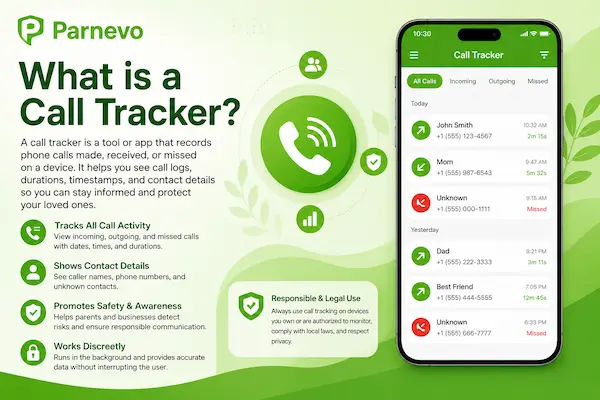
Call Tracker: This is a tool which enables you to see calls that took place through your device or phone system, it organizes activity. It typically displays incoming calls, outgoing calls, missed calls (with the underlying numbers), contact names of all those with whom you spoke and information like date and time of call as well as call duration. It can be used by parents to help identify unknown callers or unusual calling patterns. It can help businesses to track leads, follow up with customers and keep the team accountable.

A call tracker is not like a call recorder that always records audio. It only mostly focuses on call logs and call history instead of conversations. This makes it useful for understanding communication patterns while still requiring careful attention to privacy, consent, and local laws. A trustworthy call tracking app should be clear, secure, and used only for legitimate safety or business purposes.
What is a Call Tracker

What is a Call Tracker

Call Tracker vs Call Recorder

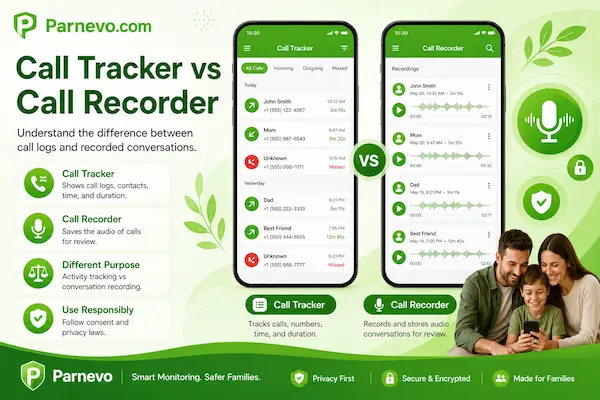
A Call Tracker and a call recorder are not the same. A Call Tracker mainly shows call activity, such as incoming calls, outgoing calls, missed calls, timestamps, phone numbers, contacts, and call duration. A call recorder captures the actual audio of a conversation, which usually creates higher privacy and legal risks.

Key Differences Between Call Tracking and Call Recording

FeatureCall TrackerCall Recorder
Main functionTracks call logs and call historyRecords voice conversations
Shows phone numbersYesSometimes
Shows call time and durationYesSometimes
Captures audioUsually noYes
Privacy riskMediumHigh
Best forParents, families, businesses, call managementSaving call content when legally allowed
Legal concernConsent and device accessConsent, recording laws, and privacy rules

Which One Should You Use?

Use a Call Tracker if you only need to understand who called, when the call happened, whether it was missed, and how long it lasted. This is usually enough for parental safety, business follow-up, and call history management.

Use a call recorder only when you clearly need the conversation audio and have the legal right to record it. In many cases, call tracking is the safer and more practical option because it gives useful visibility without storing sensitive voice content.
Call Tracker vs Call Recorder

Call Tracker vs Call Recorder

How Does a Call Tracker Work? Step-by-Step Setup

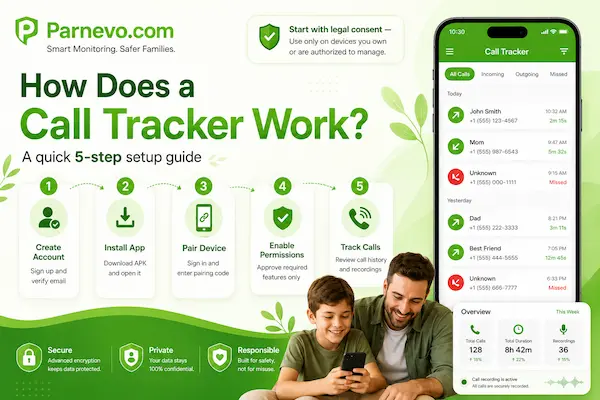
A Call Tracker works by linking a supported device to a secure dashboard, then collecting call history data such as incoming calls, outgoing calls, missed calls, timestamps, contacts, and call duration. With Parnevo, setup is designed to be fast, predictable, and privacy-aware. Where lawful, users may also enable Call Recording with clear consent.

Step 0: Check Legal Consent First

Before using any Call Tracker App, confirm that you own the device or are legally authorized to manage it. This may include a child’s phone, a family-managed device, or a company-owned device under a clear workplace policy.

Always document consent before setup. This protects parents, businesses, and device users while supporting responsible monitoring and privacy compliance.

Step 1: Create Your Account and Verify Email

Sign up with your email or phone number through the Parnevo dashboard:

https://dashboard.parnevo.com/sign-up/

After registration, open the verification link to activate secure access. A verified account helps prevent unauthorized access before you start tracking call history online.

Step 2: Download and Install the Parnevo App

Go to the Parnevo Download Center:

https://download.parnevo.com/

Download the Parnevo APK file on the device you are authorized to manage. Open the APK file, tap Install, wait for installation to finish, then tap Open.

Step 3: Sign In and Link Your Device

Sign in to your dashboard:

https://dashboard.parnevo.com/sign-in/

Tap Pair New Device, then select Let’s Get Started to connect a new device. Follow the on-screen steps. In the final step, enter the pairing code and click Pair Now to complete the connection.

Step 4: Set Up Required Permissions

Open the Parnevo App, go to More > Permissions Setup > Check All Features.

To collect accurate call tracker data and keep reporting stable, Parnevo needs selected Android permissions. Use a least-privilege approach: enable only the permissions required for your package, policy, and lawful purpose. Confirm each permission before leaving the device.

Step 5: Start Tracking Call History and Call Recording

Once the device is paired and permissions are approved, you can review call history from the Parnevo Dashboard on mobile, tablet, or web.

A properly configured Call Tracker can help you monitor incoming calls, outgoing calls, missed calls, call duration, and contact activity more consistently. If Call Recording is enabled, make sure consent and local legal requirements are clearly documented first.
How Does a Call Tracker Work? Step-by-Step Setup

How Does a Call Tracker Work? Step-by-Step Setup

Why Do People Use a Call Tracker?

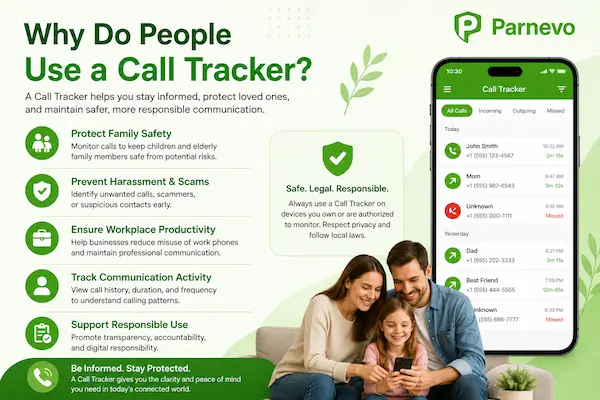
People use a Call Tracker App to understand phone call activity more clearly and respond faster when something needs attention. Instead of checking call logs manually, a call tracking app organizes incoming calls, outgoing calls, missed calls, timestamps, contact names, and call duration in one place.
Call Tracker for Parents

A Call Tracker for parents helps families see who a child is calling, who is calling them, and when those calls happen. It can help identify unknown numbers, repeated calls, late-night calls, or unusual communication patterns that may need a parent’s attention.

Call Tracker for Businesses

A Call Tracker for business helps companies manage customer calls, missed leads, sales follow-ups, and support performance. It shows useful call details such as answered calls, missed calls, call duration, caller numbers, and team response patterns.

Call Tracker for Personal Use

Some users use a Call Tracker to organize their own call history, check missed calls, review frequent contacts, or identify suspicious numbers. This can be helpful for managing daily communication, avoiding spam, and keeping important call records easier to find.

Call Tracker for Safety and Risk Detection

A Call Tracker can also help detect early warning signs in phone communication. Repeated calls from unknown numbers, sudden increases in call activity, very short calls, or late-night calling patterns may suggest spam, harassment, scams, bullying, or unsafe contact.

Why Do People Use a Call Tracker

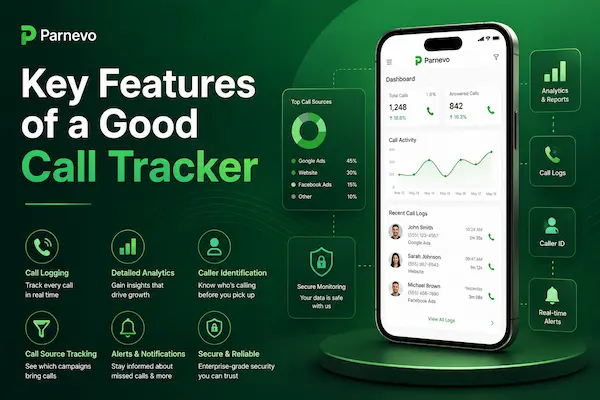
Key Features of a Good Call Tracker

A good Call Tracker should make call activity easy to understand, not confusing. The best call tracking app shows clear call logs, useful details, secure access, and simple reports so parents, businesses, and individuals can review phone communication with confidence.

1. Incoming and Outgoing Call Logs

A reliable Call Tracker should show both incoming and outgoing calls. This helps users understand who is contacting the device, who the user is calling, and whether any call pattern looks unusual. For parents, this can reveal unknown numbers or repeated contact. For businesses, it helps track customer calls, sales activity, and team follow-up.

2. Missed Call Tracking

Missed calls can be important. A good call tracker app should clearly show missed calls, caller numbers, timestamps, and call frequency. For businesses, missed call tracking can prevent lost leads. For families, it may help parents notice repeated missed calls from unknown or suspicious numbers.

3. Contact and Number Details

A Call Tracker should display saved contact names, phone numbers, and unknown callers in a simple format. This makes it easier to identify who is communicating with the device. Clear contact details are especially useful when reviewing repeated callers, unfamiliar numbers, or possible spam activity.

Key Features of a Good Call Tracker

Key Features of a Good Call Tracker

Call Tracker for Android vs iPhone

A Call Tracker may work differently on Android and iPhone because each operating system handles call log access, app permissions, and privacy controls in a different way. Before choosing a call tracking app, users should check device compatibility, required permissions, and legal consent.

1. Call Tracker on Android

A Call Tracker for Android usually has more flexibility because Android allows permission-based access to call logs on supported devices. This makes it easier to review incoming calls, outgoing calls, missed calls, timestamps, contacts, and call duration from one dashboard.

For parents and businesses, Android call tracking can be more practical when the device is owned or properly authorized. However, permissions must be granted correctly, and users should avoid installing unknown or unsafe APK files.

2. Call Tracker on iPhone

A Call Tracker for iPhone is usually more limited because iOS has stronger privacy restrictions around call logs and background data access. Some tools may only provide partial tracking, manual syncing, or limited call activity visibility.

This does not mean iPhone call tracking is impossible, but users should have realistic expectations. Always check what the app can actually show before purchase, especially if you need detailed call history reports.

3. Android vs iPhone Call Tracking Comparison

FeatureAndroid Call TrackeriPhone Call Tracker
Call log accessMore flexibleMore limited
App permissionsPermission-basedStrictly controlled
Missed call trackingUsually supportedMay be limited
Background syncingOften easierMore restricted
Best forParents, families, business-owned devicesBasic visibility, limited monitoring
Setup difficultyModerateOften more limited or restricted

Is Using a Call Tracker Legal?

Using a Call Tracker may be legal when you own the device, have clear consent, or are authorized to manage it, such as a child’s phone or a company-owned device. However, call tracking laws vary by country, state, workplace policy, and the type of data collected.

1. Legal Factors to Check Before Using a Call Tracker

Before using any call tracking app, check who owns the device, whether consent is required, and whether the person being monitored has been properly informed. For business use, call tracking should be clearly written in company policy. Parents should also use a Call Tracker responsibly. Even when monitoring a child’s device, the goal should be safety, protection, and guidance, not secret surveillance or unnecessary control.

2. Call Logs vs Call Recording

Call logs and call recording are different. A Call Tracker usually shows call history, phone numbers, timestamps, missed calls, and call duration. It does not always capture the conversation itself. Call recording is more sensitive because it stores voice content. In many places, recording a call may require one-party or all-party consent. If you only need to understand call activity, call tracking is often safer and more practical than recording audio.

3. Best Practice for Legal and Responsible Use

The safest approach is to use a Call Tracker App only for legitimate purposes, with clear consent where required. Keep access limited, protect the dashboard, and avoid collecting more data than necessary. For businesses, document employee notice and internal policy. For parents, combine call tracker insights with open communication and age-appropriate digital safety rules.

Final Thoughts: Is a Call Tracker Worth Using in 2026?

A Call Tracker is worth using when you need clear, secure, and responsible visibility into phone call activity. For parents, it can help identify unknown callers, repeated contact, missed calls, and late-night communication patterns. For businesses, it can reduce missed leads, improve customer follow-up, and create better accountability across sales or support teams.

In 2026, call tracking is becoming more important because digital safety, privacy, and communication transparency are now closely connected. Families want safer phone habits. Businesses need faster response times. At the same time, privacy rules are stricter, so the best Call Tracker App must balance useful monitoring with consent, security, and legal compliance.

Start Tracking Calls Safely With Parnevo

If you want clearer visibility into call history, missed calls, unknown numbers, and communication patterns, Parnevo gives you a simple and secure way to start. With Parnevo’s Call Tracker, parents can better protect their children, and businesses can reduce missed opportunities by reviewing call activity from one easy dashboard.

Start using Parnevo now to track calls smarter, protect what matters, and take control of phone communication with confidence.

FAQs – Call Tracker App

1. What is a Call Tracker?

A Call Tracker shows call history, missed calls, numbers, time, and duration.

2. How does a Call Tracker work?

It collects call logs from an authorized device and displays them in a dashboard.

3. What does Parnevo Call Tracker show?

It shows call history, contacts, timestamps, missed calls, and call duration.

4. Can a Call Tracker record calls?

Some tools can, but call recording needs clear consent and legal compliance.

5. Is using a Call Tracker legal?

It depends on consent, device ownership, workplace policy, and local law.

6. Does Call Tracker work on Android?

Yes, Android usually supports more call log access with proper permissions.

7. Does Call Tracker work on iPhone?

It is more limited because iOS has stricter privacy controls.

8. Who uses a Call Tracker?

Parents, businesses, sales teams, support teams, and individuals.

9. Is Call Tracker the same as Call Recorder?

No. Call Tracker shows logs; Call Recorder saves audio.

10. Why choose Parnevo Call Tracker?

Parnevo helps track call history securely on authorized devices.